Menu Plugin System is a framework for showing and hiding Labels as interactive hover menu displays. With it, you can toggle plugins on and off in-game, pin and drag data all over the screen. And the settings are automatically saved, no need to copy over or edit config files.

Menus appear in variety of docking areas that border the screen. Hovering over them reveals menu panels that can be pinned open and repositioned by dragging (via integration with the Movable Plugin System's Edit Mode). To help prevent obscuring combat with accidental hovers, when you are in combat outside of town, unpinned hover menu panels will remain hidden unless you click on its label to open it.
When you click the pin icon, the title bar with pin icon will disappear to help prevent accidental unpinnings, but will reappear if you hover over the panel for at least 1.5 seconds (configurable via MenuPlugin.HoverDelay property). You can also access an overview of all the menu addons and can pin/unpin menus in addition to enabling/disabling them from there:

Once a menu panel is pinned, it can be dragged when in the Edit Mode (default hotkey F12) of the Movable Plugin System. Menu labels can also be dragged to other docks or even reordered within the same dock while in Edit Mode.
Note: The save button is there just in case you want to manually trigger a config save. All of your changes should be saved automatically, and you should never have to click it. If you didn't like your changes, click the red X to delete the config file that was generated with your changes.
Included with the distribution is:
- a plugin management menu addon to allow you to enable or disable plugins on-the-fly in-game
- a plugin management menu addon to allow you to enable or disable menu addons on-the-fly in-game
- a basic volume control menu addon
- RunStats
RunStats is now a suite of menu addons that offers data displays and statistics related to various aspects of playing the game. Currently, this includes:
- MenuAttackSpeed - shows your attacks per second for yourself and your pets, and if you have Pain Enhancer equipped, it attempts to determine your current stack count
- MenuBounties - shows your current status on bounty completion when in Adventure Mode
- MenuCrowdControl - shows icons and durations of crowd control effects applied on you and elite monsters and bosses

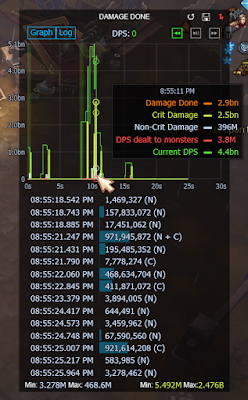
- MenuDamageDone - records the values of some damage stats made available by TH and adds them to the menu bar, visualizing the data in a line graph, shows 30 seconds at time, but you can page backwards and forwards to see the last 20+ minutes of data. Logging to file feature can be toggled on or off to auto-save data every 5 seconds.
- MenuDamageReduction - graphs your current damage reduction value history; similar to MenuDamageDone, you can page backwards and forwards to see the last 20+ minutes of data and logging to file feature can be toggled on or off to auto-save data every 5 seconds.
- MenuDamageTypes - substitute for Default\DamageBonusPlugin.cs
- MenuGreaterRift - shows nephalem rift history
- MenuNephalemRift - shows nephalem rift history
- MenuHealth - shows health change history
- MenuLoot - shows loot history

- MenuMapShrines - shows a list of pylons, shrines, and pool count seen in the current map
- MenuMaterial (Blood Shard, Deaths Breath, Greater Rift Keystones, Gold)
- MenuMoveSpeed - shows your current run speed bonus and its panel shows the buffs currently active on your character (work in progress, still filling in the speed buff data)
- MenuParagon - substitute for Default\TopExperienceStatistics.cs, and allows you to change which stat tracker is used to calculate the time-to-level
- MenuPools - shows pool count of your characters, your party, and history of pools found in the current game
- MenuSpiritBarrage - Spirit Barrage inspector
- MenuUptime - shows your in-combat uptime for a few different effects, and it will only appear if it is relevant to your character
- MenuXP - shows xp stats from various built-in stat trackers


Other plugins I've included:
- BountyDropTracker - shows on screen alerts and remembers the location if a horadric cache is dropped to the ground (for example, if someone turns in a bounty reward quest while your inventory is full) (required by MenuBounties)
- GreaterRiftHints - shows gem upgrade status for the party under Urshi's and Orek's feet, and shows Greater Rift levels unlocked and shard caps for each party member in the obelisk menu, marks monsters that are still alive in a Greater Rift after completion (these were features in older versions of RunStats' Greater Rift Helper plugin, but were cut for feature bloat, so I included them in a separate plugin so that older version users didn't feel like it was a downgrade)
- ImmunityHelper - shows countdown bars - and a visual indicator on yourself - when you and party members are immune to damage (required by MenuDamageReduction)
- ItemMapMarkers - Remembers and marks on the minimap items that match customizable rules. (this was a feature in older versions of RunStats' LootHelper plugin)
- PartyProcTracker - shows countdown bars for cheat death effects and announces them with audio or TTS cues (required by MenuDamageReduction and MenuHealth)
- SpiritBarrageHelper - shows countdown bars and ground indicators for spirit barrage phantasms and keep tracks of snapshot/buff status for each phantasm for the Spirit Barrage Inspector (MenuSpiritBarrage)
Note: These additional plugin files must be installed if you are using RunStats so that TurboHUD's compiler knows about them, but you can toggle the plugins off if you don't want to use them.
Customization
The following ICustomizer files are automatically generated in your TurboHUD \ plugins \ Razor \ Config folder when you configure menu plugins through the in-game interface. You can delete any of them at any time if you want to return to the default settings:
- DefaultPluginEnablerOrDisabler.cs
- CustomPluginEnablerOrDisabler.cs
- MenuPluginConfig.cs
- MovablePluginConfig.cs
History
RunStats? LiveStats? Why is all this stuff so similar?
I wrote RunStats back in June 2019 in response to KillerJohn's (the author of TurboHUD) open challenge to rework his run stats box as a plugin. While I was taking a break from Diablo (and computing in general) for personal reasons, API updates to TH broke RunStats.
Another mod author, hakache decided to fork RunStats into a project that he named LiveStats and wrote in some cool features of his own. While LiveStats was actively maintained, I decided that I didn't need to release new versions of RunStats to the public so that I could focus on building out other ideas.
So, I have been privately evolving RunStats as a labor of love as a side project for a while. This project includes the third rewrite of RunStats and showcases a lot of new stuff I've figured out how to do since I wrote the first version.
Changelog
Installation
Download MovableMenuPlugin_Feb-14-2026.zip (required - framework only)
Download RunStats_Feb-17-2022.zip (optional - updates coming soon!)
If you are updating from the 2022 version of the Menu Plugin System, please make a backup of your Razor folder (just in case you need to roll back to the old version) and then DELETE the following before extracting the contents of the new download:
- plugins \ Razor \ Label \
- plugins \ Razor \ Menu \
- plugins \ Razor \ Movable \
You want to overwrite everything in the Razor folder that it asks you to because this download should include the latest versions of my supporting files. The files and folders should go in the following places:
TurboHUD \ plugins \ Razor \ Config \
TurboHUD \ plugins \ Razor \ Hotkey \
TurboHUD \ plugins \ Razor \ Label \
TurboHUD \ plugins \ Razor \ Menu \
TurboHUD \ plugins \ Razor \ Movable \
TurboHUD \ plugins \ Razor \ Util \
Then (re)start TurboHUD.
Hey razor i tried turnning the arcs around your character during the immunity effects off by changing it to 0 but it didnt work??? and for some reason the code is all over the place and not in lines to eaily read.
ReplyDeleteShowIndicator is now a boolean, so you can set it to false instead of 0. Also, I found a bug while checking out your problem, and I just pushed out an update to plugins\Razor\ImmunityHelper.cs to fix it. It's in the new download dated July 19th.
DeleteYeah, i saw that and i did set it to false... BUT the countdown timer doesn't work when that's false =(.... I can live without it i guess haha.
DeleteDid the July 19th update work for you? The countdown timer not showing up when ShowIndicator is false is the error I tried to fix with it.
DeleteOH no it didnt work for me.... i have the 7/19 plugin changed, ShowIndicator = false and ( ) are gone with the timer.
ReplyDeleteHmm, could you check line 145? should be right below the PaintArea(...) signature, does it say !ShowCountdown or !ShowCountdownBar (either one works) instead of !ShowIndicator?
Deleteit does, idk if that's line 145 tho.....
Deleteif (!ShowCountdown || !IsImmune)
return;
P>S i just check the post and it is line 145,
It's a cool plugin. Thank you for your hard work and enthusiasm.
ReplyDeleteMenuToggleAddons / MenuTogglePlugins Can't these two be displayed by clicking on them instead of hovering over them? Even when the mouse touches while playing the game, it covers the entire screen, so turning it on and off unintentionally is pressed.
ReplyDeleteI'll see what I can do about that in the next update before season starts. The bigger plan is to add some in-game configuration options for menu docks that will allow you to tailor the behavior to your liking, but I can probably add in some idle animation check when outside of town or something simple in the meantime.
DeleteJust updated the download with a potential solution to your request. Details in the Changelog section.
DeleteBTW razor..... idk how or why, but the timer works when i added it to the new hud
ReplyDeleteAlways good to hear that the problem resolved itself! Maybe it was a caching issue... I saw someone mention in RB's chat room mention that one of the recent releases of TH had a caching issue, which may have meant that it wasn't compiling new versions of plugin files.
DeleteAnyway to disable the little black backgrounds behind everything, also MinimapLeft Buffs dont seem to grow up or down they grow in each direction anyway to change it so the buffs only grow down ?
ReplyDeleteAt the moment, only two ways by modifying the code in TurboHUD\plugins\Razor\Menu\MenuPlugin.cs, (1) where the docks are defined (starts at line 487), each dock definition has a LabelBrush = BgBrush, which can be commented out in order to remove the background, OR (2) setting BgBrush's alpha transparency to 0 on line 113 (or in a customization file).
DeleteMinimap buff list grow around a center point along the side of the minimap, and that is the behavior of a default TurboHUD plugin, this plugin doesn't change that.
Alright thank you very much <3
Deletei get this expections with the lastest update
ReplyDelete2021.08.10 06:50:35.060 21.7.22.20 StatTracker file is damaged: C:\Users\Krazy\Desktop\Dhud\turbohud_21.7.22.20_free\stat_tracker\133262256_total_t16_20210809.xml (System.Xml.XmlException: Root element is missing.
at System.Xml.XmlTextReaderImpl.Throw(Exception e)
at System.Xml.XmlTextReaderImpl.ParseDocumentContent()
at System.Xml.XmlReader.ReadToFollowing(String name)
at Class96.vmethod_2(XmlReader xmlReader_0)
at Class96.method_69(String string_1)
at Class340.method_23(String string_3))
NVVMMMMMM ROFL>............ solved it sorry razor<3
DeleteHow do I scroll the list of plugins if the menu overflows?
ReplyDeleteI was hoping that this case would be rare, as it doesn't currently handle having so many plugins that they don't fit on screen. I'll see what I can do about it in a future update.
DeleteHi Razor.
ReplyDeletei love your addon! truly amazing! but i encounter some weird stuff. im new and i hope its not a dumb "user-error" :) : I cant click anything, my chars walk instead. i can do f12 and move stuff. i can hover over buttons to see the popupwindow (menü, dmg, network, everything i can see) but i cant click anything on it (like pin it). what did i wrong? :/
When you move stuff with F12, does your character move around too? Did you disable any of the plugins that came in this download?
Deletehi, thanks for the fast response
Deleteif i use f12 i can move the plugin elements without charaktermovement.
i disabled a couple thinks like spiritbarage helper (from you), playerbottombuff (from default). i also thought i did a misstake by setting
Hud.TryTogglePlugin("Enhanced.UiElementClickBlockerPlugin", false);
to true. but i changed it back to false in code and still same problem. i dont know if it helps, but it all startet as i played with the cc-plugin. i pinned it down to see what i can get for informations in grifts... after 1 grift it annoyed me that it is over that chat window. so i moved the cc-window to the right. after a couple runs i decided that i dont need it. thats where i encountered the problem. i couldnt close the window cause my carakter moves instead of clicking the hud-ui-element-what-ever-it-is-called xD
then i wanted to deactivate it over your menü (top right). same thing. charakter walks instead of doing a click. so i deactivated the cc-list in the scriptfiles.
https://gyazo.com/531d97bc68e828c44675d4cf46d6d3ac with f12
Deletehttps://gyazo.com/87e91d5f9855219edbe81976d29ee05a my problem :)
only cc deactivated: https://gyazo.com/22a0e303256c5a9010cbcb4d6950e5c0
Deletecustomplugins: https://gyazo.com/7d52c95728a9b7c5d99d505b174f0816
default i cant click ingame, so heres the file: https://pastebin.com/PNw0dHps
Your custom plugins picture shows that Razor.Label.LabelController is disabled - that is the plugin that manages all of the menu click events.
Deleteoh my god. u are a amazing. sorry for bothering you. maybe you remove the option to deactivate it from you menu? or make big ass tooltip when u hover it? so dumb ppl like me accidendly dont deactivate it by playing around :(
Deletelove u and keep going with this amazing plugin!
This comment has been removed by the author.
ReplyDelete@Razor doesn't this rifthelp show legendary names on mini map? i have one that does ground only but not on minimap
ReplyDeleteLootHelper from the old RunStats used to show ancient and primal legendary markers on the minimap, but I removed it due to feature bloat (or rather, I forgot to add it into the new version since I got lost in the sea of work on the other addons) and the previous questions from users about how to disable it.
DeleteI can probably add the feature back in as an optional plugin in the next update to Menu Plugin System, which should be pretty soon (almost done with this round of bugfixing and feature creep).
YEah that would be COOL !!! I like it in t16 zooming pass shit and hate going back to see what the item is..... LOL.... BTW I couldnt get this plugin to work inside C HUD???? i tried so many things.... all ended in errors....
DeleteSince I don't run TurboHUD CN/Lightning, I would need to see the error log to be sure what is going on there. Meanwhile, I helped a with a TurboHUD CN/Lightning user with a similar issue in my Movable plugin thread at Ownedcore the other day. His error log revealed that TurboHUD CN does not have a plugins\User folder, which is where my plugins are trying to write config files. The solution was a to create a new "User" folder in the "plugins" folder.
DeleteCertain values are shown outside the screen for the MenuPools plugin (eg. 8.49, with 8 being printed halfway outside)
ReplyDeleteHmm, I wasn't able to reproduce that problem, even when setting the pool plugin to print 8.49 specifically. What screen resolution are you running the plugin in? Is your monitor curved? Do you have a screenshot (at least the part of the screen that shows the problem) that I could look at?
DeleteSorry, it was not 8.49 but 7.49 and 7.67. I tested it in Windowed (Fullscreen) in 1920x1080 and Windowed 1280x720. Both had the same issue with the first digit being printed halfway outside the game window.
DeleteI have no curved monitor.
I have 2 screenshots depicting the issue: https://imgur.com/a/0IzO5E6
What are those white bands along the left edge of the screenshots? They look like they're from some other plugin that is drawing on top of mine.
DeleteIt's the white background of Windows Explorer, it got caught in the screenshot capture when D3 was in windowed mode.
DeleteThis latest update to MenuPools allows you to move the pool counter anchor for your portrait around on your screen, and all party members' pools will be shifted accordingly
Delete@razor
ReplyDeleteSO i think i see the problem with this plugin and Chud.... this is the error im getting
2021.09.19 06:24:58.043 21.9.1.0 OnCollectFinishedUnSafe exception (System.IO.DirectoryNotFoundException: Could not find a part of the path 'C:\Users\Krazy\Desktop\TurboHUD_LightningMOD\plugins\User\MovablePluginConfig.cs'.
at System.IO.__Error.WinIOError(Int32 errorCode, String maybeFullPath)
at System.IO.FileStream.Init(String path, FileMode mode, FileAccess access, Int32 rights, Boolean useRights, FileShare share, Int32 bufferSize, FileOptions options, SECURITY_ATTRIBUTES secAttrs, String msgPath, Boolean bFromProxy, Boolean useLongPath, Boolean checkHost)
at System.IO.FileStream..ctor(String path, FileMode mode, FileAccess access, FileShare share, Int32 bufferSize, FileOptions options, String msgPath, Boolean bFromProxy, Boolean useLongPath, Boolean checkHost)
at System.IO.StreamWriter.CreateFile(String path, Boolean append, Boolean checkHost)
at System.IO.StreamWriter..ctor(String path, Boolean append, Encoding encoding, Int32 bufferSize, Boolean checkHost)
at System.IO.File.InternalWriteAllText(String path, String contents, Encoding encoding, Boolean checkHost)
at Turbo.Plugins.Razor.Movable.MovableController.Log()
at Turbo.Plugins.Razor.Log.DelayedLogQueue.Queue(ITextLogController TextLog, ITextLogger plugin, Single delay)
at Turbo.Plugins.Razor.Movable.MovableController.AfterCollect()
at ..()
at .(IPlugin , String , Action )
at .(Object , EventArgs )
at .(Boolean ))
The path isn't right to the user folder on C-hud the path would be TurboHUD_LightningMOD\TurboHUD\plugins\User
but the error says its going TurboHUD_LightningMOD\plugins\User
how can i make it go to TurboHUD_LightningMOD\TurboHUD\plugins\User
WELL ATM I cheated...... i just made a folder "plugins" added user folder to that path and it worked...... But yeah so the pathing to the user folder on Chud is different if anyone ask about the above error!!!!!!! =)
DeleteNOw i cant save tho.... It doesn't auto save and when i try saving. By clicking the button at the top right... i get this error OVER and over
Delete2021.09.19 08:07:35.761 21.9.1.0 OnCollectFinishedUnSafe exception (System.NullReferenceException: Object reference not set to an instance of an object.
at Turbo.Plugins.Razor.Menu.MenuTogglePlugins.Log()
at Turbo.Plugins.Razor.Log.DelayedLogQueue.NotifyLogQueue(ITextLogController TextLog)
at ..()
at .(IPlugin , String , Action )
at .(Object , EventArgs )
at .(Boolean ))
You could try changing the ConfigFilePath property near the top of the MenuTogglePlugins file. The default value is "plugins\User\" but changing it to "TurboHUD\plugins\User\" might get CN TH to find the right location.
DeleteWORKED! i started to just copy pass like the old days in runstat ROFL... but no, changing the location worked great.
Delete@Razor how do i move the toggle plugins over more to the right??? Yours up above shows them far to the right, but mine are far to the left???
ReplyDeleteIf you click on page 2, the plugin settings on page 1 will be changed.
ReplyDeleteThanks for letting me know about the issue. It looks like I forgot to update the toggling function to factor in paging. I'll have it fixed in the next update, but meanwhile, you can fix it yourself in Razor\Plugin\MenuTogglePlugins.cs on line 627 - change SelectedFilter.Plugins[Table.HoveredRow] to SelectedFilter.Plugins[Table.HoveredRow + SelectedFilter.Skip]
DeleteThank you. It works after the change.
DeleteSo this Plugin was working perfectly up until today, where it's randomly started giving errors, it looks like it's trying to find the files in System32 instead of the actual folder?
ReplyDeleteOnCollectFinishedUnSafe exception (System.IO.DirectoryNotFoundException: Could not find a part of the path 'C:\Windows\System32\User\MovablePluginConfig.cs'.
at System.IO.__Error.WinIOError(Int32 errorCode, String maybeFullPath)
at System.IO.FileStream.Init(String path, FileMode mode, FileAccess access, Int32 rights, Boolean useRights, FileShare share, Int32 bufferSize, FileOptions options, SECURITY_ATTRIBUTES secAttrs, String msgPath, Boolean bFromProxy, Boolean useLongPath, Boolean checkHost)
at System.IO.FileStream..ctor(String path, FileMode mode, FileAccess access, FileShare share, Int32 bufferSize, FileOptions options, String msgPath, Boolean bFromProxy, Boolean useLongPath, Boolean checkHost)
at System.IO.StreamWriter.CreateFile(String path, Boolean append, Boolean checkHost)
at System.IO.StreamWriter..ctor(String path, Boolean append, Encoding encoding, Int32 bufferSize, Boolean checkHost)
at System.IO.File.InternalWriteAllText(String path, String contents, Encoding encoding, Boolean checkHost)
at Turbo.Plugins.Razor.Movable.MovableController.Log(String path)
at Turbo.Plugins.Razor.Log.DelayedLogQueue.Queue(ITextLogController TextLog, ITextLogger plugin, Single delay)
at Turbo.Plugins.Razor.Movable.MovableController.AfterCollect()
at ..()
at .(IPlugin , String , Action )
at .(Object , EventArgs )
at .(Boolean ))
Hmm, I couldn't reproduce this error. TurboHUD\plugins\Razor\Log\TextLogger.cs attempts to determine the current path data with System.IO.Directory.GetCurrentDirectory() on line 127. Maybe some runtime conditions or Windows update might cause that to return C:\Windows\System32 or an empty value (either way, finding out what that function is returning and what the RelativePath value is would be key). You could try changing the return value on line 139 to a string path that you know is correct instead of having the function try to figure it out on its own.
DeleteHello, Razor, Is it possible to track custom debuffs on champions/rare(elite) monsters like it's doing MenuCrowdControl? For example to see icon of Entangling shot from dh support or cyclone debuff from binding of lesser gods bracers, or any other debuff.
ReplyDeleteIt's not quite as straightforward as checking (de)buffs on players. I would point you towards configuring Monster Markers, and possibly check the Monster Counter code to see some ways that monster statuses are checked.
Deletehttps://turbohud.razorfish.dev/2021/08/monster-markers.html
https://turbohud.razorfish.dev/2021/05/monster-counter.html
Hey Razor :)
ReplyDeleteThis Plugin is like a WOrk of a MASTER ( wu-tang-style) !
Thank you for this :)
But i have One question ;
Under the Monsters, there shows me , what skills they have ( Acrane,Illusionist,Mortar,Vortex, etcetcetc )
---> My question ;;; How can i deactivate this ? <---
I use another Plugin, that shows me already, what skills the elite-monsters have
Kind regards , bazzzz
You're welcome! To answer your question, I think you can accomplish this by disabling the EliteMonsterAffixPlugin in the Default plugins section of the Toggle Plugins menu.
DeleteYeeeezzz, it was thaat:))
DeleteThx man ! :))
One question moore pls :D
ReplyDelete;;;
For example, i fight with Elites/enemies , who have Poison-dmg ( on the Floor, i have round Poison-areas ) , the Plugin shows me a Round Circle, where the Poison on the Floor IS ..
How can i deavtivate this Circles ? i dont find the name of this plugin :/
kind regards , bazzzz
That feature is from another default plugin, EliteMonsterSkillPlugin.
Deletehttps://www.ownedcore.com/forums/diablo-3/turbohud/turbohud-discussions/647651-how-disable-plagued-circles.html
How to change font and font size is something I want to know. I have issues with small fonts.
ReplyDeletein TurboHUD\plugins\Razor\Menu\MenuPlugin.cs, on or around lines 36-37 are the public properties FontSize and TooltipFontSize. You can also change those values in a separate ICustomizer file. Each plugin addon handles its own creation of the font resources themselves using these shared properties.
DeleteClickExtensions.cs(3,8) : error CS0246: The type or namespace name 'Gma' could not be found (are you missing a using directive or an assembly reference?)
ReplyDelete2022.02.21 23:37:01.492 22.1.5.0 GlobalHookThread.cs(15,8) : error CS0246: The type or namespace name 'Gma' could not be found (are you missing a using directive or an assembly reference?)
2022.02.21 23:37:01.492 22.1.5.0 ClickExtensions.cs(8,18) : error CS0246: The type or namespace name 'IKeyboardMouseEvents' could not be found (are you missing a using directive or an assembly reference?)
2022.02.21 23:37:01.492 22.1.5.0 GlobalHookThread.cs(19,10) : error CS0246: The type or namespace name 'IKeyboardMouseEvents' could not be found (are you missing a using directive or an assembly reference?)
I am getting these errors, how do I get rid of them?
Delete your TurboHUD\plugins\Razor\Click folder, I phased it out in the latest version.
DeleteActually, on second thought, it sounds as though that is what you did that you maybe have my "Action" plugins folder installed. You can go ahead and delete the Razor\Action folder as well.
DeleteIt's working now, thank you!
DeleteWhen was the last update to TurboHUD that caused several plugins to stop working?
hello~
ReplyDeleteAre you thinking of making a menu system like EliteBarPlugin(gigi)?
The quickest option for me was to convert s4000's (DAV) EliteInfoPlugin (which is a combo of several elite monster related plugins) into a Movable plugin. It worked well enough to allow me to move the bars around on the screen or hide them that I didn't think it needed to be converted into a menu plugin. This is the original plugin code posted by s4000 (not movable):
Deletehttps://pastebin.com/Gazfy6t2
Unfortunately, my modified version includes some changes that require another plugin I wrote that I never released publicly, so I would have to sort that out before posting it...
How can I convert Eliteinfo to Movable plugin?
Delete(on the s4000 EliteInfoPlugin in the upper left corner)
I am always grateful to be able to use your system.^^
Sorry for the delayed response! I just uploaded a the original plugin by s4000 with some quick modifications to use the Movable Plugin System at the following link, but I didn't get a chance to test it out since I don't have this computer set up to play D3 atm:
Deletehttps://www.dropbox.com/s/n29xb8mk4xxt4z2/DAV_EliteInfoPlugin_Movable.cs?dl=0
not moving^^
DeleteThank you for your hard work.~
Oh, I forgot the most important thing, the position changes for the drawing code! Well, I added them now, you should be able to find the updated code in the same download link: https://www.dropbox.com/s/n29xb8mk4xxt4z2/DAV_EliteInfoPlugin_Movable.cs?dl=0
Deletenot moving^^
DeleteJust to verify, does the plugin you installed have the following code on line 114?
Deletefloat x = area.Rectangle.X + deltaX;
have the following code on line 114 // -> float x = area.Rectangle.X + deltaX;
Deleteexception.txt :
DAV_EliteInfoPlugin_Movable.cs(110,44) : error CS0136: A local or parameter named 'x' cannot be declared in this scope because that name is used in an enclosing local scope to define a local or parameter
Ah, I've updated the code again to hopefully fix that error. Changed the variable usage at line 110 from "x => x.MonsterAlive" to "mp => mp.MonstersAlive".
DeleteSame download link:
https://www.dropbox.com/s/n29xb8mk4xxt4z2/DAV_EliteInfoPlugin_Movable.cs?dl=0
It works fine.^^
DeleteThank you so much for your work
Any major changes lately? We are now heading into the holiday season and at least one plugin on my copy of the suite still lists Ethereal drops from S24! So last year. Is there a download link to the most recent version of the suite with a changelog?
ReplyDeleteI haven't worked on any plugins in a while, though I had an update for the menu system that I didn't get around to pushing out before I stopped...
DeleteWould it be possible to update the suite? I've noticed a slight mistake in the MaterialsGold.cs that changes the calculation to the correct value. It has always been off. In the Spent section, the value needs to be negative. Ex: -78k/hr. (Poor example, but you should get the idea.)
ReplyDeleteBeen getting an error with the latest HUD update for MenuPlugin, LabelController, PartyCOE and MovableController. Any advice on which lines to change?
ReplyDeleteerror CS0246: The type or namespace name 'IMouseClickHandler' could not be found (are you missing a using directive or an assembly reference?)
error CS0246: The type or namespace name 'IMouseClickBlocker' could not be found (are you missing a using directive or an assembly reference?)
The functionality provided by IMouseClickHandler and IMouseClickBlocker are required for those plugins to work - they handle mouse input for interactions with the game screen. Do IMouseClickHandler.cs and IMouseClickBlocker.cs exist in your TurboHUD\interfaces\input folder? I am not familiar with the latest update to TH, but an earlier S29 PTR version I saw floating around still has those files (they are only there for informational purposes for plugin writers, but that means those interfaces are present in the API).
DeleteI have my own implementation of mouse input processing that I wrote before TH added it to their core API, but I phased it out because it would not work as smoothly as something handled by TurboHUD natively.
The latest update from LighningMod removed that function and i would verry much appreciate it if you could help me fining a work around for it
DeleteThis comment has been removed by the author.
DeleteBoth plugins used to exist in the TurboHUD\interfaces\input folder but the LightningMod dev had removed the implementation. Any ideas on how to restore the functionality? Every time I start it up, they will be deleted automatically, and pasting them back doesn't work either.
DeleteIMouseClickHandler.cs and IMouseClickBlocker.cs
ReplyDeleteThese files were deleted in lightningmode because of this it stopped working. Can I fix it somehow?
If you put these files in the Click folder, the error disappears but movement and everything else does not work
Sorry, I made a mistake, you should put it in interfaces\input. Previously there was a mention in Turbo.Plugins.dll, but it looks like these plugins were removed from there
Deletei was writing with te developer of lightningmod and he said he removed it cause he does not use it.
DeleteIf you have a version outside of this, you can use it. See my post below. If you have a plugin suite from the English version, it is possible to transfer said plugins to this version. If you don't, you can always redownload them thru Ownedcore, provided the plugin authors are still around.
DeleteThe Chinese version is still kicking around after the NA/EU version got 86ed. It's called Lightning Mod. I'm still kicking it around, as well. I've transferred most of the plugins I used for the English version to the Chinese version with very little exceptions.
ReplyDeleteAny possibility for an update to MenuPlugin to have it work with LightningMod?
ReplyDeleteOh, it works quite well, if you have a copy of it from the original TH.
DeleteI just wrote an implementation of IMouseClickHandler and IMouseClickBlocker as a plugin to recreate the functionality removed by the developer of LightningMod. Now figuring out how I should package it so that I don't have to maintain two versions of my plugins, one for TurboHUD Free and one for LightningMod... It want it to just be an extra download for LM users.
DeleteAlso probably need some LM users interested in testing it out for me, I don't use it or have any friends who use it.
Delete> Razorfish
DeleteI can test it out for you.
> Vernon
Is there a version of TurboHUD that isn't LM that's still actively maintained to this day? I'd like to use that instead, but I have not found anyone who uses it
TurboAll,
DeleteLM is the only one active, AFAIK. Blizz is actively looking for any others to shut down to my knowledge. It's one of the reasons I don't play as much as I should...
>Is there a version of TurboHUD that isn't LM that's still actively maintained to this day? I'd like to use that instead, but I have not found anyone who uses it
DeleteI have updated the link to TurboHUD Free on the Help page of this site (question mark link on the top right menu). It is maintained by a clanmate, so there's no PR to get it out to the masses.
Is it possible for IMouseClickBlocker.cs to block clicks not only in the ui but also in the actor? I would like to set the automatic item pickup plugin I use to not click on the orek that appears after completing the Great Rift.
ReplyDeleteGodhelper, created by godly, automatically picks up items without orek being clicked. Godly probably used a function in IMouseClickBlocker.cs.
ReplyDeleteThis comment has been removed by the author.
ReplyDeletegetting this when i start Thud free with my 20k paragon account
ReplyDelete2025.01.15 03:21:31.457 1.4.2.0 actor collection exception (System.IndexOutOfRangeException: The index was out of bounds of the array.
at collectors.ActorCollector.method_7(Player class310_0)
at collectors.ActorCollector.Collect()
at work.CoreCollector.UpdateInternal(Boolean bool_7))
hi any chance to add reset session to menuxp??
ReplyDeleteDoes anyome have a working LightningModPluginEnablerOrDisabler , since the app doesnt let u customize by clicking, maybe is possible trought a file, thx.
ReplyDelete